
Termly Privacy Policy Generator in 2026: What It Helps With, What It Misses, and 7 Live Checks
Anyone evaluating termly privacy policy generator in 2026 is really balancing operational risk, marketing ambition, and buyer trust at the same time. A policy page alone does not solve that problem; the workflow behind the site does.
The decision around termly privacy policy generator usually turns on trust, conversion, and operational risk at the same time. The teams that get it right are the ones that test the live journey instead of relying on policy language alone.
The safer answer is: use the generator as a drafting shortcut, then compare the output against the live site, the real tracking stack, the rights flow, and the places where you actually collect personal information.
Termly’s own product pages are fairly clear about the shape of the tool. The privacy policy generator is promoted as free to start, “Lawyer-vetted,” and guided step by step. Termly also says you should “review your policy” before publishing and “place your policy where visitors can easily find it.” Its release notes add one operational detail many teams miss: policy changes become effective only after you republish through the dashboard. That matters because privacy laws still care about what the live page says now, not what a generator could say later. The European Commission still says privacy information should be presented in a concise, transparent, intelligible way using “clear and plain language,” and the California Privacy Protection Agency still says the privacy policy must be posted through a link with the word “privacy” in it and connected to the notice-at-collection flow.
If you want nearby context first, start with these guides to best privacy policy generator, website privacy policy generator, and privacy policy for website. This page stays narrower. It is the termly privacy policy generator review I would use this week before trusting a generated draft on a live site.
If your team is trying to get termly privacy policy generator under control without adding a heavyweight privacy stack, DataShyre can help. DataShyre focuses on consent and preference management that are easier to implement, easier to operate, and easier to trust on a live site. Start with DataShyre’s consent and preference management or book a demo.
If your team is using Termly because the draft is easy but the real site is messy, DataShyre can help with the harder layer around data mapping, consent management, and DSR automation. The expensive failures usually come from the gap between the published policy and the runtime behavior, not from the lack of a template.
1. Start with the live site, not the wizard
The first termly privacy policy generator mistake is answering the prompts from memory.
That sounds harmless.
It is not.
Termly’s own flow asks about how your business collects, uses, and shares personal information. The European Commission’s summary of GDPR rights still points to the same core items users have a right to understand: purposes, categories of personal data, legal basis, storage period, recipients, transfers, rights, and complaints paths.
So before you trust the generated draft, inventory the real site:
- contact, demo, booking, and checkout forms;
- newsletter and account-registration flows;
- analytics, ads, session replay, and embedded media;
- chat, CRM, scheduling, payment, and support tools;
- mobile-app permissions, if the same business also runs an app.
If that inventory is incomplete, the termly privacy policy generator will produce a clean explanation for an incomplete reality.
2. Separate the policy generator from Termly’s other privacy tooling
This is the next place teams get overconfident.
Termly does not only sell the generator. It also sells a cookie consent manager with scanning, blocking, consent logs, DSAR forms, and “Do Not Sell or Share My Personal Information” links.
That separation matters.
A termly privacy policy generator can help you draft the disclosure layer, but it is not the same thing as the runtime control layer.
If your team needs to:
- block optional cookies before consent;
- scan and classify cookies on the live site;
- log choices for audit purposes; or
- publish California opt-out links and request paths,
then the privacy policy generator alone is not the whole answer.
This is also where a DataShyre implementation review can help if your site already mixes CMP logic, forms, custom scripts, and California or EU obligations. The policy page should describe the system honestly, but a page cannot enforce the system by itself.
3. Push the draft past generic clauses and into specific categories, purposes, and recipients
A lot of generator output sounds responsible without saying enough.
Termly’s own FAQ about privacy policies lists the usual elements: what personal data you collect, why you collect it, how it is collected, whether it is shared or sold, what rights users have, how they can act on those rights, your use of cookies and other trackers, retention, and international transfers where relevant.
That means the termly privacy policy generator should not survive review if it only says:
we may collect information to improve our services
The published page should let a normal person understand:
- what data categories you collect;
- where they come from;
- why you use them;
- who receives them;
- how long you keep them; and
- what rights route exists for the person reading the page.
California’s current general-notices guidance is useful here because it is specific. The CPPA says the privacy policy should describe categories, sources, purposes, disclosures, rights instructions, contact details, and the date the policy was last updated.
If the draft still reads like it could belong to any company in any stack, it is not done.
4. Treat cookies, trackers, and embedded tools as a separate review branch
This is where many privacy-policy workflows quietly break.
Termly’s privacy policy generator page says policies for websites and blogs should help visitors understand data collected through contact forms, cookies, analytics, newsletter subscriptions, and embedded content. Termly’s broader product line also shows that cookie consent management is its own product category for a reason.
So when reviewing termly privacy policy generator output, check whether the page matches:
- the live banner or preference center;
- cookie categories and actual tracker behavior;
- embedded tools like chat, video, maps, or scheduling widgets;
- analytics and advertising recipients; and
- the path for revisiting choices later.
If your policy says users can adjust preferences any time, test that path in the browser.
If your banner says analytics or ad tech stays blocked before consent in certain regions, test that too.
This is exactly the point where the policy draft and the live site often drift apart.
5. Publish the page where the law and the product both expect it
This check sounds boring, but it is one of the easiest ways to fail cleanly.
Termly says to “place your policy where visitors can easily find it.” Its FAQ also says common placement points include the footer, main menu, checkout page, sign-up page, and places where people provide personal information. California’s current CPPA guidance says the notice at collection must appear at or before collection and must link to the privacy policy, while the policy itself must be posted through a link using the word “privacy.”
That means a real termly privacy policy generator publication review should confirm:
- the privacy policy has a stable public URL;
- the footer or main navigation uses the word
privacy; - collection points link to the policy where needed;
- mobile users can still find the page without hunting; and
- California-specific paths are visible if your business needs them.
If the page exists but nobody can reasonably find it at the point of collection, the generator did not finish the job.
6. Republish when Termly or the law changes
This is one of the clearest operational checks on the page.
Termly’s release notes say two important things:
- the generator is updated as privacy laws evolve; and
- policy changes only become effective after you republish.
That means a termly privacy policy generator is not a one-time asset.
It is a release artifact.
Revisit the page when:
- Termly updates the generator for a new law or requirement;
- your business adds a new vendor or processor;
- your forms, onboarding, checkout, or app permissions change;
- you start using AI tools, cross-border transfers, or new tracking tools;
- your request-handling workflow changes.
If the team assumes the hosted policy silently stayed current without republishing, that assumption needs to be checked.
7. Review the rights path like a user, not like a copy editor
The best-looking draft can still fail here.
The CPPA says the privacy policy should inform consumers about their rights and how to exercise them, including instructions, online request links if offered, verification details for relevant requests, and how opt-out preference signals are processed. The European Commission’s rights summary also still points users to rights such as access, erasure, restriction, portability, objection, and complaint routes.
So for termly privacy policy generator output, the questions are not only did the generator mention rights.
They are:
- does the page tell people what rights may apply;
- does it explain how to submit the request;
- do the links or forms actually work;
- does the contact method match how the business really handles requests; and
- do the policy, banner, and request workflow tell the same story?
If the rights section is elegant but the route is broken, the draft is still weak.
A practical 7-step review for this week
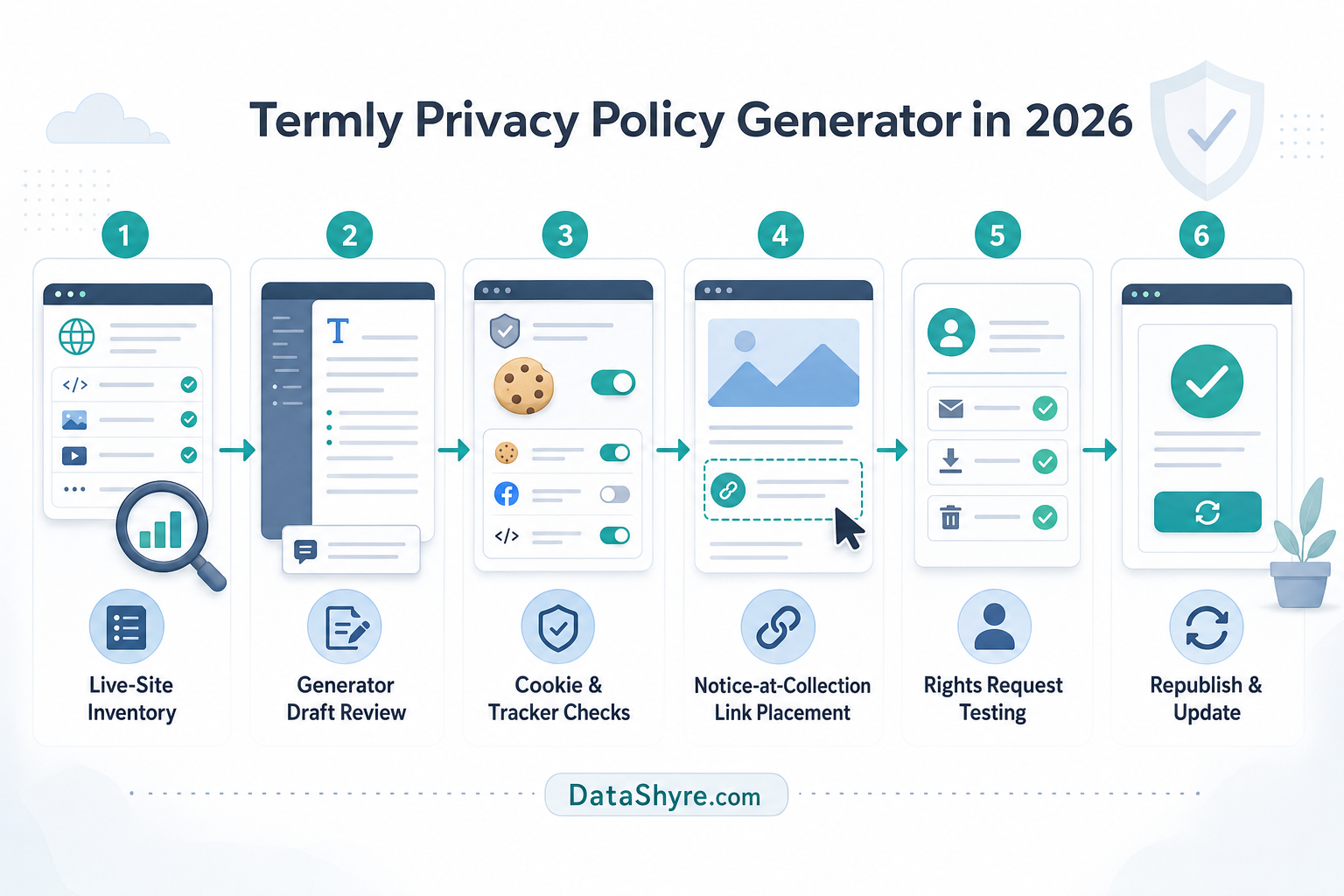
If I were approving termly privacy policy generator output today, I would use this order:
- map the live forms, apps, scripts, vendors, and collection points first;
- separate policy drafting from cookie and DSAR tooling assumptions;
- rewrite vague clauses into real categories, purposes, recipients, and retention logic;
- compare the page against the banner, cookies, and embedded tools on the live site;
- place the policy where users can find it at the point of collection and through a visible privacy link;
- check whether a republish is needed after product or legal changes;
- test the rights path like a real user.
That sequence usually reveals the real gaps faster than polishing the prose.
FAQ
Is the Termly privacy policy generator free?
Yes, Termly says you can create and publish one basic privacy policy for free with no credit card required. Paid plans add broader editing, additional coverage, and more publishing options.
Does the Termly privacy policy generator update automatically after legal changes?
Not by itself on your live page. Termly says it updates the generator as laws change, but its release notes also say policy changes become effective only after you republish.
Is the Termly privacy policy generator enough on its own?
No. It can help draft the privacy notice, but cookies, consent behavior, DSAR handling, opt-out links, and live vendor behavior still need separate review and often separate tooling.
Bottom line
The best use of a termly privacy policy generator in 2026 is not to replace review.
It is to speed up the first draft while your team checks the parts that generators cannot see on their own: the live stack, the collection moments, the rights flow, and the gaps between the banner, the vendors, and the published page.
If those checks hold up, the generator did useful work.
For most teams, termly privacy policy generator becomes easier to manage once it is treated as an operating decision instead of a one-time banner task.